100% KVKK CompliantISO 27001Turkey Data Center
0850 305 88 66  ·  info@mailguard.com.tr
Get a Quote
HomeFeaturesSolutionsDocsToolsMail Test
Home / Features

Everything you'd expect from a gateway — and a few things you wouldn't.

MailGuard is more than a spam filter. It combines the reputation infrastructure that gets your outbound mail delivered with the filtering layer that stops inbound mail before it reaches your users — all on one platform.

About the cPanel / WHM module ↗
Recent message activityAll logs ↗
bilgi@example.com✓ Delivered14:26
satis@example.com✓ Delivered14:11
destek@example.net✓ Delivered13:58
tanitim@ornek.com✕ Threat blocked13:40
Authentication
SPF PASS
DKIM PASS
DMARC PASS
⚠ Threat blocked

A message with a malicious attachment was rejected before connection.

Outbound Inbound DKIM & identity IP pools Reporting Infrastructure Integration
Outbound mail

Outbound mail control

Filtering outbound traffic is the most overlooked yet most critical part of the job. A customer's compromised WordPress install or a stolen email password can destroy deliverability for every domain on your server within hours.

  • Rate limiting and quotasSeparate counters are kept per authenticated user, sending domain and source server IP. A sudden burst in volume is the first sign of a compromised account; when a threshold is crossed, sending is throttled or stopped.
  • Content and link inspectionEvery outbound message goes through spam scoring, malformed-MIME checks, an attachment policy and link-reputation inspection; risky messages are reviewed before they leave your server.
  • No silent droppingA blocked message is never silently discarded. The source server receives an explicit response during the SMTP session; you see the reason in the dashboard.
Sending policiesAdd rule
Domain / UserHourly quotaUsageStatus
example.com5.000
Normal
example.org2.000
Normal
example.net1.000
Limited
tanitim@example500
Normal
SMTP sunucu yanıtı (örnek · reddedilen gönderim)
220 relay.mailguard.com.tr ESMTP MailGuard
MAIL FROM:<user@example.com>
550 5.7.1 Message rejected, rate limit exceeded.
550 5.7.1 Please reduce your sending rate and try again later.
Inbound mail

Inbound mail protection

When you point your MX record to us, all inbound traffic passes through us first. The cost of filtering — connections, disk, CPU — stays with us; only clean mail reaches your server.

  • Pre-connection filteringBotnet and zombie-machine traffic is rejected before the SMTP session is fully open, using reputation lists and behavioral tests.
  • Sender identitySPF, DKIM and DMARC are verified. Spoofed messages impersonating your domain (including CEO fraud) are separated out here.
  • Content analysisStatistical classification, fuzzy signature matching, Office macro analysis and malicious-link inspection work together.
  • Virus scanningScanning with known malware signatures and supplementary signature sets; malicious attachments are removed before they reach your server.
  • Recipient verificationMail sent to addresses that don't exist on your server is rejected before acceptance — so you never generate backscatter.
The action is your choice. You can reject a high-scoring message, forward it tagged with [SPAM] and leave filing to the user, or simply add a header and let it through. Thresholds are set per domain.
Inbound mail analysisLast 24 hours
8.420
Delivered in
326
Blocked
284
Spam
7.810
Clean
fatura@ornekfirma.comSafe · delivered
SPF PASSDKIM PASSDMARC PASS
bilinmeyen@phish.exampleMalicious · rejected
SPF FAILDKIM FAILDMARC FAIL
DKIM & sender identity

DKIM and sender identity

The most common mistake an intermediate relay makes is altering the message and invalidating its existing DKIM signature. MailGuard solves this with three rules.

  • No tamperingThe message body and signed headers are left unchanged, and no advertising or filter header is added to outbound mail. Your source server's DKIM signature passes through intact.
  • Hosted DKIMFully managed: you only keep a single CNAME record, key rotation is handled by us. The signature is applied with d=yourdomain.com, keeping DMARC alignment.
  • Local signingIf there is neither a signature at the source nor a CNAME, the message still doesn't leave unsigned; a missing-configuration warning is shown in the dashboard.
Authentication resultValid
Frombilgi@example.org
Tokullanici@ornek.com
SPFPASS
DKIMPASS · selector1
DMARCPASS · aligned
CNAME kaydı (örnek)
selector1._domainkey.example.org.
CNAME selector1.example.org._domainkey.mailguard.com.tr.
IP pools & reputation

IP pools and reputation management

Our outbound IPs are spread across several independent network blocks. Even if one block lands on a list, the others keep working.

PoolUse
Warm-upNew customers start here; volume is increased gradually.
StandardA shared pool for customers with an established history.
PriorityClean-history corporate traffic, mostly transactional mail.
IsolatedA tenant that exceeds complaint or bounce thresholds is moved here; the main pools are protected.

Each domain is assigned a fixed IP within its pool. Reputation models on the receiving side reward consistency; random IP rotation hurts.

Outbound architecture
Your server
cPanel / Plesk
Exchange
MailGuard
Gateway
Warm-up
Standard
Priority
Isolated

On every outbound IP, forward and reverse DNS records match (FCrDNS) and the server name in the SMTP session matches too — this is the first thing large providers check.

Visibility & reporting

Visibility and reporting

Every step of your email traffic is logged; you don't guess why a message was rejected — you see the remote server's response exactly as given.

  • Per-message loggingFor each message we store the sender, recipient, result, remote server response, outbound IP used and filter score.
  • SMTP session transcriptYou don't guess why a message was rejected; you see the receiving server's response exactly as given.
  • AlertsAutomatic notifications for bounce rate, complaint rate, quota overruns and missing DNS configuration.
  • API and webhooksDelivery, deferral, bounce and complaint events can be streamed into your own systems.
Message LogsFilter
Last 24 hours7g30g
TimeSenderRecipientStatus
14:26bilgi@example.comalici@...delivered
14:12satis@example.commusteri@...delivered
13:58destek@exampleinfo@...delivered
13:40spam@phish.exx@...rejected
Infrastructure

Infrastructure

Secure transport, redundant gateway architecture and consistent authentication.

ComponentDetail
ArchitectureRedundant gateway setup; if one node goes down, traffic flows through another
Outbound IPsMultiple network blocks, reputation-based management
Transport securitySTARTTLS, with DANE and DNSSEC validation on delivery
AuthenticationSMTP AUTH (587 / 465) or authorization by registered source IP
LocationTurkey
Redundant architecture
Web server
Application
Mail server
Redundant
gateway
Gmail
Outlook
Corporate
Tested by our own rules: our sending scores full marks in independent deliverability tests, and our outbound IPs are regularly scanned against reputation lists.
Easy integration

Works with your existing server. Managed easily from WHM.

Start using MailGuard without changing your existing infrastructure. Manage the whole server from WHM; connect any platform with SMTP Relay / Smarthost support in a few settings.


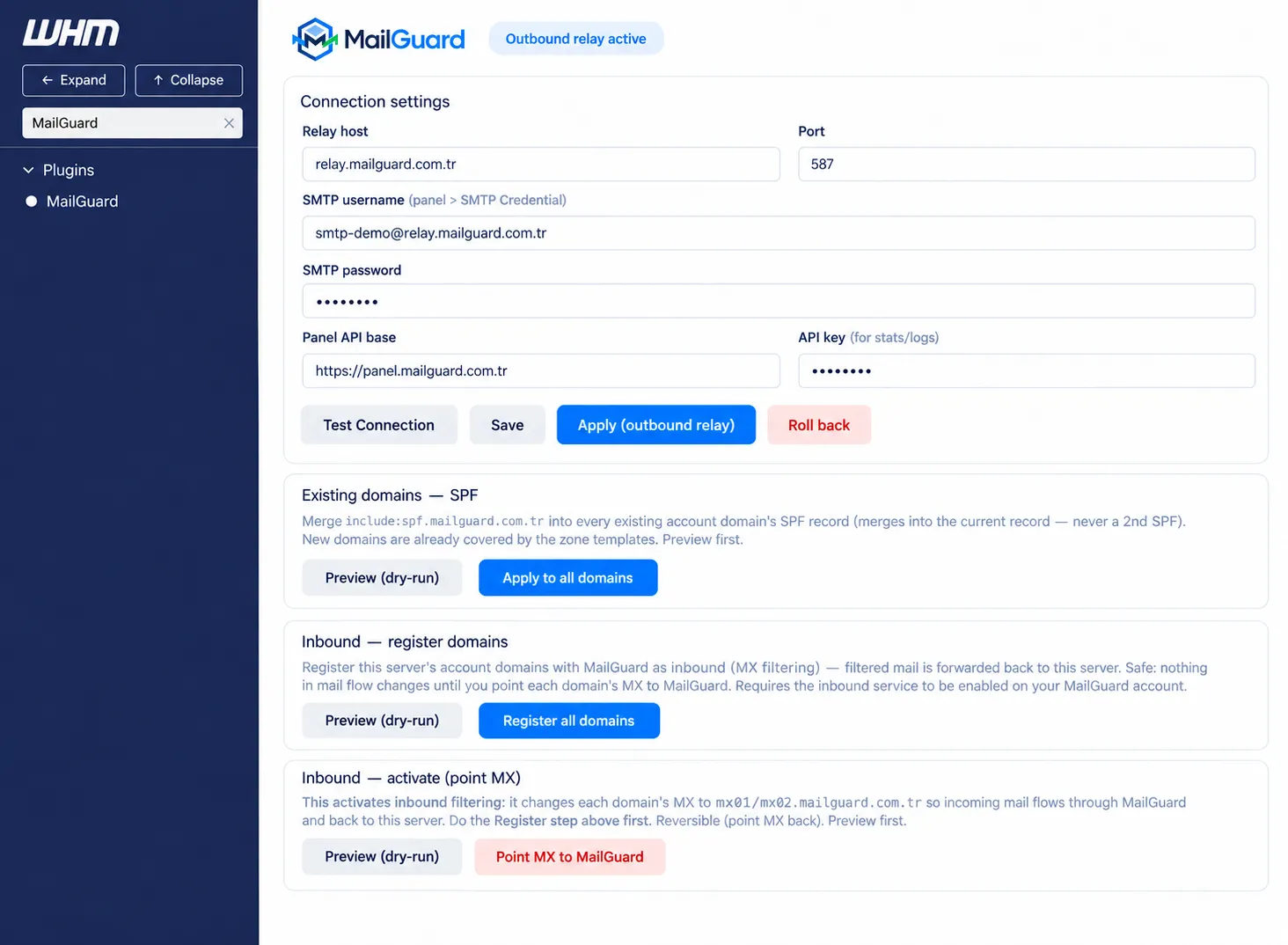
  • Route outbound mail in one clickThe cPanel / WHM module writes the Exim smarthost route, tests it and rolls back if needed.
  • Bulk-update SPF recordsBulk-update your existing domains' SPF records from the panel and easily enable inbound routing.
cPanel Plesk DirectAdmin Microsoft Exchange Zimbra Postfix
Explore the cPanel integration →
MailGuard WHM modülü — relay ayarları, SPF güncelleme ve gelen posta yönetimi

Let's see together whether it fits your setup.

Let's talk through your servers and volume and put together a realistic migration plan.

Get a Quote Browse the docs